


Digimon Card Game Encyclopedia
4.285.00 Reviews
App Specs
- Version
- 0.10.0
- Updated On
- License
- Free
- Downloads
- 100,000+
- Developer
- Hophoppoppop
- Categories
- Libraries & Demo
- Platform
- Android
Screenshots
 Analysis by AppCompare
When I first opened Digimon Card Game Encyclopedia, I wanted a quick way to get oriented without juggling scattered notes and browser searches. That is the useful promise of a card-game reference app: it should help me answer a specific question, then get out of the way. This one is aimed squarely at people who want Digimon card information close at hand, whether they are learning the game or already building decks. I would treat it as a companion for looking things up and organizing ideas, rather than assuming it replaces learning the rules or playing against another person.
What to expect from a Digimon-focused reference
The app sits in the libraries-and-demo corner of the app world, and that framing fits better than thinking of it as a standalone game. Its central appeal is having a Digimon Card Game reference on a phone. The developer is Hophoppoppop, and the app is free to install, with optional in-app purchases priced from 49 cents to $69.99 per item. It is rated for Everyone, so its subject matter is accessible to younger fans as well as adult players, though purchases are still worth keeping in mind if a child will use the device.
There is a reassuring amount of community interest around it: it has an average rating of 4.2 from around 850 ratings, and has passed 100,000 installs. Those numbers make it easier to see that this is not an obscure personal project with no audience, but they are not a substitute for checking whether its approach suits you. It was released on November 14, 2020, and its current version is 0.10.0, with Android 7.0 as the minimum operating system. I would check that requirement before trying to install it on an older device.
The title sets a clear expectation, but I would still begin with one simple job rather than trying to explore everything at once. If you have a card in front of you and want to understand what it does, use that as your first test. A reference app proves its value when it helps you resolve a real point of confusion quickly—not when you spend ten minutes tapping around without a question in mind.
A calm first setup and a useful first success
For a first-time user, I recommend opening the app before a match or a busy shop visit, when there is time to learn where its reference material lives. Start with a card you already know, then look for a less familiar one. Comparing those two searches gives you a feel for the way the encyclopedia presents information and whether its organization makes sense to you. That small trial is more useful than attempting to memorize the whole interface.
Once you find a card, pause long enough to read the complete entry rather than stopping at the first visible detail. In a card game, a single word or condition can change how you interpret an effect. I find it helpful to turn a lookup into a practical check: identify the part of the card you did not understand, read the entry, then explain the effect back to yourself in plain language. That is a modest first success, but it builds confidence and helps you remember the answer later.
If you are new to the game, keep a short list of questions as you browse: what does this card contribute, what kind of deck might want it, and which phrase on the card needs a rules check? The encyclopedia can support that learning process, but I would not treat a card entry as a replacement for the official rules when a close ruling matters. For an informal play session, a reference can settle routine lookups; for a disputed interaction, using the authoritative rules is the safer choice.
Worth Reading Before You Choose

EA SPORTS FC Mobile 26 Is a Bigger Football Game, but It Takes Time

Flipboard Shows What News Apps Must Do Beyond the Feed

Switching to Android Auto Means Rethinking Your Driving Routine

Google Calendar Makes a Crowded Week Easier to Manage

Ludo King Makes the Most of the Minutes Between Plans

Baby Panda World Brings Quick Play to Modern Phones, but Its Game Library Feels Busy
Using the encyclopedia as a player, not just a browser
I use the encyclopedia most effectively when I treat it as part of preparing to play: I look up a card I’m unsure about, compare it with a second option, and then return to the table with a clearer question or deck idea. That keeps browsing purposeful and helps me notice where a reference is useful—and where a rules source or another player’s judgment is still the better next step.
Search with a purpose and build better habits
The first thing you’ll notice about this app is how comprehensive it is. It covers everything from basic rules to advanced strategies. Whether you're a newbie just getting into the game or a seasoned player looking to refine your tactics, this app has something for everyone.
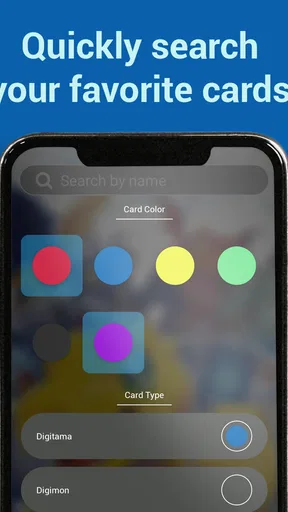
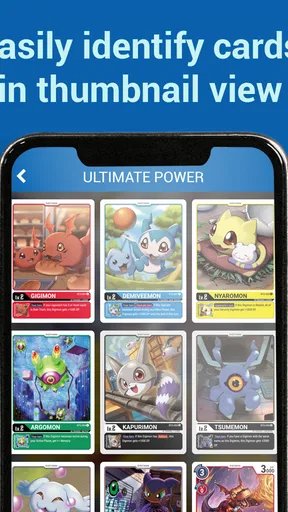
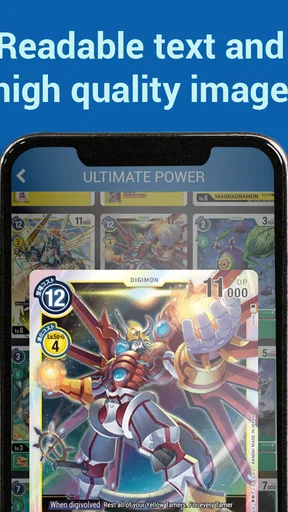
One of my favorite features is the card database. It’s like having a digital library of every card at your fingertips! You can search by name, type, or level, which makes it super easy to find exactly what you’re looking for. Plus, each card comes with detailed stats and descriptions. It’s like having a mini card encyclopedia on your phone.
That search approach is most useful when I begin with a clue rather than a perfect card name. If I remember a card’s name, a direct lookup should be the quickest route; if I only remember its type or level, those details give me another way to narrow the hunt. A practical habit is to note the exact wording of the card you are trying to find before searching. Similar names and related card concepts are easy to mix up when you are relying on memory, and checking the entry against the physical card helps avoid confidently studying the wrong one.
User Interface and Experience
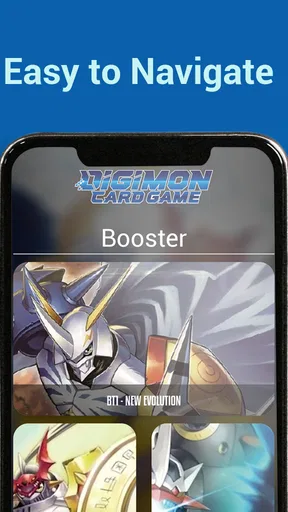
The user interface is sleek and intuitive, which is a big win in my book. Navigating through the app feels natural and straightforward. The design is clean, with bright colors that reflect the vibrant world of Digimon.
But it’s not just about looks. The app loads quickly and runs smoothly, even on older devices. There’s nothing worse than lag when you’re trying to look up a card mid-game, and thankfully, you won’t have that issue here.
In ordinary use, I would still separate quick reference from deep study. During a match, searching for one card and reading the relevant detail is a sensible phone task; exploring several possibilities while the other player waits is not. Before a casual game, I would look up uncertain cards and jot down the key questions mentally, then keep the phone available for genuine edge cases. This makes the app more considerate to your opponent and keeps the game moving.
There is also a useful trade-off in keeping a reference on the same device you might use for messages or other distractions. A quick lookup can save time, but it can also interrupt concentration if every result leads to another search. I suggest setting a narrow goal—check one card, compare two options, or review a deck idea—then closing the app when that goal is met. That makes it a tool for play rather than a detour from it.
Deck planning, with realistic expectations
One cool feature is the deck builder. You can create and customize your decks right in the app. This tool is incredibly helpful for testing out new strategies or tweaking your existing decks. You can also save multiple decks, which is great if you like to switch things up depending on your opponent.
I would use that builder first as a planning space, not as proof that a deck will perform well. A saved list lets you keep an idea intact while you compare alternatives, and separate versions can make it easier to see what changed after a revision. One non-obvious way to use it is to save a baseline before experimenting. Then, if a change makes the deck feel less coherent, you have a reference point to return to rather than trying to reconstruct your earlier choices from memory.
Another helpful workflow is to make one adjustment at a time. If you change several cards together, it becomes difficult to tell which choice improved the plan and which one merely looked appealing. I like the idea of saving a version for a particular opponent or play style, but I would avoid treating multiple saved lists as a substitute for testing. A deck builder can organize choices; actual games reveal whether those choices work together.
For someone who already keeps deck lists in a notebook or general-purpose notes app, the encyclopedia’s dedicated builder is more convenient when the goal is specifically card-game planning. A notebook remains better for free-form thoughts, match notes, and personal reminders. I would use both if I were developing a deck seriously: the app to keep lists tidy, and a separate note to record why I made a change or what I want to test next.
Events, updates, and the limits of one app
The app also offers updates on the latest tournaments and events. It’s a great way to stay in the loop and maybe even find a local event to test your skills in real life!
For event information, I would use this as a starting point and verify practical details with the event organizer before making a trip. A reference app can help you notice opportunities, while the organizer is the better place to confirm a venue, schedule, or registration requirement. That distinction matters most when you are planning around work, school, or public transport: discovering an event is useful, but accurate logistics are what get you through the door.
A realistic everyday use might be checking a card during a lunch break, saving a deck idea for later, and then reviewing it before a casual evening game. That is where a phone encyclopedia makes sense: each task is small, and the app keeps the reference and planning close together. If you mostly want to follow competitive news, watch matches, or discuss rulings with other fans, a dedicated community or video source may be a better fit. The encyclopedia is strongest when the question is about cards and preparation, not when you need a social conversation or live coverage.
Who will get the most from it
If you love the Digimon Card Game, this app is a no-brainer. It’s like having a personal assistant dedicated to making you a better player. The app is regularly updated, so you’ll always have the latest information and strategies at your disposal.
I would particularly recommend it to a new player who recognizes cards but still needs help connecting their names, types, levels, and descriptions. It can also suit a returning player who wants to refresh their memory before bringing an old deck back to the table. Collectors may appreciate having a digital reference for browsing, while people who enjoy tinkering with lists can use the builder to keep experiments organized.
On the other hand, this is not the right choice for someone who wants a digital version of the card game itself, a complete lesson plan, or a guaranteed answer to every complicated rules interaction. If your main need is formal rules adjudication, consult the official rules. If you want to play online, look for a dedicated game. And if your interest in Digimon cards is only occasional, a general web search may be enough without adding another app to your routine.
The optional purchases deserve a little attention even though the app is free to install. The listed range runs from 49 cents to $69.99 per item, which is broad enough that I would check the purchase prompt carefully before confirming anything. A first-time user can begin by seeing whether the free experience answers their basic questions; there is no reason to spend simply because an extra option appears. This is especially sensible on a shared family device, where purchase controls should be managed by the account holder.
Why You’ll Love It
But don’t just take my word for it. Give it a try and see how it enhances your gaming sessions. Whether you’re analyzing your next move or just geeking out over your favorite cards, this app is a must-have for any fan.
My more measured recommendation is to try it with a concrete task: find a card, understand one detail, or save a deck idea. If it makes that task easier, it has earned a place on your phone. If you find yourself opening it without knowing what you need, or if its organization does not match the way you think about cards, a paper reference or another card database may suit you better. The best tool is the one you will actually use at the table.
One question a new user may have is whether this is mainly for beginners or experienced players. I see a role for both, but in different ways: a beginner can use it to build familiarity with card details, while an experienced player can use the database and deck planning to revisit options. Another natural question is whether it can settle every rules disagreement. I would not rely on any encyclopedia alone for a complicated ruling; use it to identify the card and then check the official rules when the interaction is not straightforward.
Final Thoughts
In the end, the Digimon Card Game Encyclopedia is more than just an app; it’s a companion for every Digimon card enthusiast. With its comprehensive database, intuitive design, and handy features, it’s designed to make your gaming experience smoother and more enjoyable.
So go ahead, download it, and dive into the digital world of Digimon. Who knows? It might just be the edge you need to become the ultimate card champion!
Pros
- Comprehensive card database.
- Regular updates with new releases.
- Offline access available.
- User-friendly interface.
- Search and filter options.
Cons
- In-app ads can be intrusive.
- Limited customization features.
- No multiplayer features.
- Occasional loading delays.
- Requires frequent updates.
FAQs for Digimon Card Game Encyclopedia
What is the Digimon Card Game Encyclopedia app?
The Digimon Card Game Encyclopedia is a comprehensive app designed to provide players with detailed information about every card in the Digimon Card Game. It includes card descriptions, images, and strategies to help both new and experienced players enhance their gameplay and collections.
Is the Digimon Card Game Encyclopedia app free to use?
Yes, the Digimon Card Game Encyclopedia app is free to download and use. However, it may offer in-app purchases or premium features that provide additional content or ad-free experiences. Always check the app store for specific details about pricing and features before downloading.
Can I use the Digimon Card Game Encyclopedia offline?
The app requires an internet connection to initially download card data and updates. However, once the data is downloaded, you can access much of the information offline. Keep in mind that some features, like updates or community interactions, may still require an internet connection.
Does the app include all the latest card updates and expansions?
Yes, the Digimon Card Game Encyclopedia is regularly updated to include the latest card releases and expansions. This ensures that players have access to the most current information and strategies. Check for updates in the app store to ensure you have the latest version.
Is the app suitable for new players?
Absolutely! The Digimon Card Game Encyclopedia is designed for players of all levels. It offers beginner-friendly guides and explanations, making it an excellent resource for new players looking to learn the game. Experienced players will also find advanced strategies and detailed card analyses.


